Midjourneyは「平均的に美しい構図」に寄りやすいので、角度を言葉で強く固定するのは有効です。
ポイントは:
-
視点を明確化
地平線の位置を指定
レンズ感を書く
主語を「camera」にする
- ■ 強制・上から俯瞰(かなり強め)
- ■ 強制・下から見上げ(かなり強め)
- ① 極端俯瞰(神視点)
- ② 極端あおり(英雄視点)
- ③ 真横・舞台構図(静の象徴)
- ④ 三分割・映画構図
- ⑤ 中央対称・儀式構図
- ⑥ 斜め構図(動)
- ⑦ シルエット逆光
- ⑧ 手前大・奥小(遠近誇張)
- ⑨ フレーム内フレーム
- ⑩ 円環構図(守護・循環)
- ■ まず前提
- ■ 推奨コントロール設計
- ■ 一番重要なこと
- 🧠 カード構図制御テンプレ(いつでもコピペOK)
- ① 正面対称の儀式構図
- ② 低アングル(英雄・支配)
- ③ 高俯瞰(俯瞰・俯察)
- ④ 三分割(遠近・ドラマ)
- ⑤ 円環(和合・循環)
- ⑥ 近接&象徴(抽象化)
- 🧠 書き方ルール(必須)
- 🧠 なぜこの順番が効くか?
- ❗ Lexica (Stable Diffusion系)の特性
- 🔧 Lexica用に書き換えるポイント
- 🛠 Lexica向けプロンプトに変換する例
- 📌 Lexica向けテンプレ化も可能
- ☝️ LexicaとMJの棲み分け
- 📊 まとめ
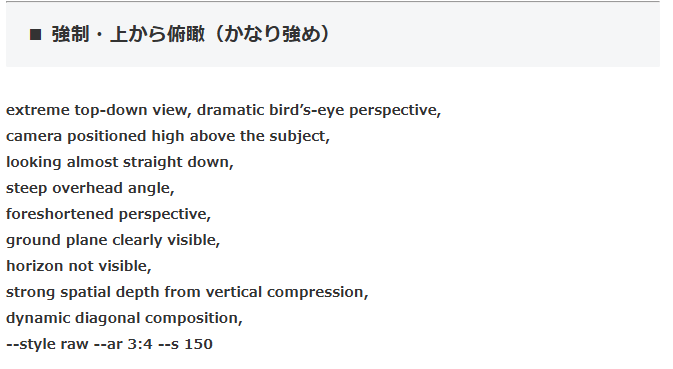
■ 強制・上から俯瞰(かなり強め)
camera positioned high above the subject,
looking almost straight down,
steep overhead angle,
foreshortened perspective,
ground plane clearly visible,
horizon not visible,
strong spatial depth from vertical compression,
dynamic diagonal composition,
–style raw –ar 3:4 –s 150
より強くするなら:
を足すと逃げにくいです。
■ 強制・下から見上げ(かなり強め)
camera placed near ground level,
looking sharply upward,
towering vertical dominance,
horizon line very low,
dramatic upward perspective distortion,
heroic monumental composition,
strong vertical lines,
–style raw –ar 3:4 –s 150
さらに固定するなら:
を追加。
重要なのは:
-
「slightly」や「soft」など曖昧語を消す
-
最初の20語以内に視点を書く
構図の型を10個ほど作ってローテーションすると、癖がかなり減ります。
必要なら「構図テンプレ集」を作りましょうか。
とても良い段階に来ていますね。
構図を“型”として持つのは、カード制作では強力です。
**Midjourney用・構図テンプレ集(強制寄り)**を出します。
※各テンプレは「プロンプト冒頭に置く」こと。
クロード
質問。 以下のプロンプトを先頭に足して角度を付けているのだが、どうしても俯瞰した角度しか出ないことが多い。 何か原因がわかる? 対処法が知りたい。
原因
Midjourneyはキャラクターデザイン・リファレンス系のプロンプトと極端なカメラアングルが干渉しやすいです。
特に以下のキーワードが「正面図・設定画」を優先させてしまいます。
character design reference
flat color, clean lineart
character reference sheet
white backgroundこれらがカメラアングル指定を上書きしてしまうのが主な原因です。
対処法
① アングル指定をプロンプトの先頭ではなく末尾直前に移動
40-year-old Japanese male, ~~~~,
flat color, clean lineart, anime style,
worm's-eye view, camera near ground level, looking sharply upward
--ar 2:3 --niji 6
② character design reference を外す
アングルを付けたい場合はこのキーワードを削除してください。
③ アングルをさらに強調する言葉を追加
あおり(②)の場合
worm's-eye view, extreme low angle, looking up at the character,
feet and legs in foreground, face far above,
dramatic perspective, strong foreshortening,
俯瞰(①)の場合
bird's-eye view, extreme high angle, looking down at the character,
top of head visible, feet small in distance,
dramatic perspective, strong foreshortening,
④ アスペクト比を変える
| アングル | 推奨比率 |
|---|---|
| あおり | --ar 9:16 |
| 俯瞰 | --ar 1:1 または --ar 4:3 |
📌 まとめ
character design referenceと極端なアングルは相性が悪いので外すのが一番効果的です。アングル指定はプロンプトの末尾近くに置いてください。
① 極端俯瞰(神視点)
② 極端あおり(英雄視点)
③ 真横・舞台構図(静の象徴)
④ 三分割・映画構図
⑤ 中央対称・儀式構図
⑥ 斜め構図(動)
⑦ シルエット逆光
⑧ 手前大・奥小(遠近誇張)
⑨ フレーム内フレーム
⑩ 円環構図(守護・循環)
コツは:
-
1枚につき「構図テンプレは1つだけ」
seed固定で構図だけ差し替えて検証
その通りです。
現行Midjourney(v6系)では従来の固定seedは実質使えません。
なので制御軸は主に:
-
–style raw
–stylize(–s)
–chaos
構図の言語固定
アスペクト比
になります。
■ まず前提
あなたがやりたいのは
「ランダム性を上げる」ではなく
「構図を固定して差分を作る」ですね。
なら chaosは低め が正解です。
■ 推奨コントロール設計
● 構図を固定したいとき
–style raw –s 100 –chaos 0
-
raw → 余計な“美的平均化”を減らす
s100前後 → 過剰演出を抑える
chaos0 → ブレを最小化
● 構図だけ保って表情や細部を揺らす
● 発想段階で崩したいとき
(これ以上は構図が壊れやすい)
■ 一番重要なこと
Midjourneyは数値よりも
最初の20語で構図を決めます。
悪い例:
a king sitting on a throne, extreme low angle…
良い例:
extreme low-angle worm’s-eye view, camera near ground, towering vertical dominance, a king sitting on a throne…
構図を“主語”にする。
もしよければ次は:
-
カード制作向け「構図制御の順番テンプレ」
-
Midjourneyが平均化しやすい構図の癖一覧
どちらを深掘りますか?
いい質問です。
2つ合わせて丁寧に解説します。
✅ 1) カード制作向け「構図制御の順番テンプレ」
Midjourneyで安定した構図を出したい時に有効なのは、
構図を宣言→主役→環境→光→スタイル → 解像・演出数値
という順番で書くこと。
これはプロの撮影ライティングと概念が近い。
🧠 カード構図制御テンプレ(いつでもコピペOK)
<補助要素>,
<空間設定>,
<光と影>,
<全体演出>,
<仕上げタグ>
ここに例を入れたテンプレ集です。
① 正面対称の儀式構図
medium close-up subject,
minimal background,
soft ambient light from above,
symbolic composition,
oracle card illustration,
outer 10 percent safe to crop,
–style raw –s 100 –chaos 0
② 低アングル(英雄・支配)
no clutter around,
subtle rim light from above,
minimal background,
symbol of authority,
oracle card illustration,
outer 10 percent safe to crop,
–style raw –s 100 –chaos 5
③ 高俯瞰(俯瞰・俯察)
clear ground plane,
shadows minimal and soft,
symbolic minimal space,
oracle card illustration,
outer 10 percent safe to crop,
–style raw –s 100 –chaos 0
④ 三分割(遠近・ドラマ)
background geometry low detail,
soft directional side light,
cinematic feel,
oracle card illustration,
outer 10 percent safe to crop,
–style raw –s 120 –chaos 5
⑤ 円環(和合・循環)
gentle radial light,
neutral background,
emphasis on relations,
oracle card illustration,
outer 10 percent safe to crop,
–style raw –s 80 –chaos 0
⑥ 近接&象徴(抽象化)
very shallow depth,
soft glow around edges,
iconic symbolic focus,
oracle card illustration,
outer 10 percent safe to crop,
–style raw –s 80 –chaos 10
🧠 書き方ルール(必須)
-
構図句は最初に置く
→ 構図を最優先にする -
曖昧ワードは後ろへ
(gentle, soft など) -
演出数値は末尾
→ 説明と干渉しない -
人数・大きさ・位置を明示する
→ Midjourneyは曖昧が最大の敵
例:
🧠 なぜこの順番が効くか?
Midjourneyは初めの語順で「最重要情報」を取り込みます。
だから
構図 → 主題 → 補助 → 光 → スタイル
という順番がもっとも安定。
✅ 2) Lexicaでプロンプトは出せるか?
結論:
YES。ただし書き方は変える必要あり。
❗ Lexica (Stable Diffusion系)の特性
Lexicaは
-
Stable Diffusionベース
-
学習済み画像に近い再現指向
なので
-
形容語の反映が強い
-
構図固定はMidjourneyより“言語依存”が強い
-
カオスやバリエーション数値はない
🔧 Lexica用に書き換えるポイント
Midjourneyと違い:
-
--style raw→ 無い -
--s/--chaos→ 無い -
代わりにより具象的な指定・背景設定・レンズ等を入れる
🛠 Lexica向けプロンプトに変換する例
※ Midjourney版:
dominant subject in foreground,
soft rim light from above,
↓
※ Lexica版:
※ Lexicaは視点指定を文章化することで絵を制御します。
📌 Lexica向けテンプレ化も可能
例:
例:
☝️ LexicaとMJの棲み分け
| 使い所 | 強み |
|---|---|
| Midjourney | 構図固定・演出的綺麗さ |
| Lexica | 具象的な写実・細部描写 |
| どちらも | カード用アイテム・背景・キャラ立ち |
📊 まとめ
✅ 方向性は正しい
➡ 構図制御の順番テンプレは実用的
➡ Midjourney / Lexicaはプロンプト形が違う
➡ Lexicaでも十分カード絵は作れる
コメント